How to Install a rack mount battery backup System Correctly?
Installing a rack mount battery backup properly ensures your critical infrastructure remains operational during power disruptions, protecting valuable data center equipment, telecom systems, and industrial controllers. These specialized uninterruptible power supply (UPS) systems integrate seamlessly into standard 19-inch server racks, offering zero-transfer-time protection through advanced lithium-ion chemistries like LiFePO4. Unlike traditional tower units, rack-mounted solutions maximize vertical space while delivering superior energy density and longer cycle life—essential for environments where every square foot counts and downtime translates directly to revenue loss.
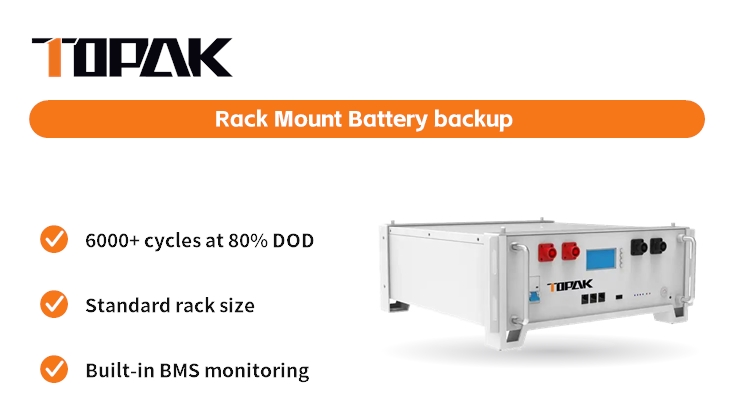
Understanding Rack Mount Battery Backup Systems
Rack mount battery backup is a power security device that is built to fit right into the layout of your current server cabinet. The main difference between these systems and regular stand-alone UPS units is that these systems are horizontal and come with mounting tools built in.
What Makes Rack Mount Solutions Different?
The main benefit comes from making good use of space and controlling temperature. Traditional tower backups take up floor space and create areas where heat builds up, but rack-integrated units use the airflow paths that are already there in your cabinet. Modern systems use advanced Battery Management Systems (BMS) that talk to each other using CAN or RS485 protocols. This lets installations that are spread out be monitored in real time for cell voltage, temperature, and state-of-charge. This connection is especially helpful when handling multiple battery banks that are set up to work together.
Key Technologies Powering Modern Systems
Chemistry based on lithium iron phosphate (LiFePO4) has become the standard for tough uses. The TP-48100R from TOPAK is a good example of this development. It has a nominal voltage of 51.2V and a capacity of 100Ah across a 16S1P module setup. Up to 15 units can be connected in parallel, giving the system a backup capacity that can be increased from 5.12kWh to over 76kWh while keeping the same rack footprint. With 6,000 cycles at 80% depth of discharge, these batteries last almost ten times longer than lead-acid alternatives, which makes the total cost of ownership much lower. The unit is small (430 x 442 x 177 mm), so it can fit in multiple standard 42U cabinets while still leaving enough space for airflow.
Application-Specific Design Considerations
Telecommunications infrastructure needs to be very reliable. Base stations that are located in rural areas need battery systems that can work in a wide range of temperatures and when the power line is unstable. To protect NVMe storage stacks and keep financial processing systems from having to roll back transactions, data centers favor instantaneous switchover, which is measured in milliseconds. Electromagnetic interference is a problem in industrial automation settings. To solve this problem, communication methods need to be shielded, and shelters need to be strong enough to withstand the conditions on the factory floor.
Preparing for Installation: Key Considerations
Deployment that goes well starts weeks before the equipment gets to your facility. Knowing the load requirements and weather limits can help you avoid expensive reinstallations and efficiency loss over time.
Calculating Your Power Requirements
First, check the nameplate ratings of all the connected equipment. Add up the wattage of all the peripherals, computers, switches, and storage systems that need to be backed up. Allow 20% extra headroom to account for inrush currents that happen when equipment is first turned on. For a few milliseconds, power sources can draw 1.5 to 2 times their steady-state load. The TP-48100R can handle 100A continuous discharge, which is equal to about 5kW at 51.2V. It can protect medium-sized telecom installations or edge computer groups. The amount of time your battery lasts depends on how fast it drains. In theory, a 50A load (2.5kW) gives you two hours of backup, but in practice, this is only 15 to 20 percent of that time because the generator loses efficiency and the battery power drops when it's under load.
Environmental and Safety Compliance
For the best battery performance, make sure that the temperature at the placement spot stays between 0°C and 45°C. LiFePO4 cells lose some of their power when they get below freezing, but TOPAK's alternative self-heating mode can be used in cold climates. Make sure there is enough airflow—lithium batteries produce heat during high-rate discharge cycles, and not enough airflow speeds up the aging process. Make sure your unit has the IEC62619 certification for cell safety, the UN38.3 certification for transportation compliance, and any other regional approvals that are needed (UL, CE, FCC). These certifications aren't just pieces of paper; they're the result of strict testing procedures that include safeguards against overcharge, short-circuiting, and thermal runaway.
Pre-Installation Tool and Resource Checklist
Get Phillips and flathead screwdrivers, torque wrenches that are calibrated to the manufacturer's specs, Velcro straps (not zip ties, which can damage the insulation), and a digital multimeter for testing to make sure everything is correct. For professional setups, you need tools that are insulated and rated for DC power work, as well as the right safety gear for you. Read the manufacturer's assembly instructions carefully. TOPAK gives you a lot of information about terminal torque requirements, wire gauge requirements for current ratings, and BMS setup parameters. To make sure they follow local electrical codes and meet insurance requirements, many businesses hire certified electricians who are familiar with DC power systems.
Step-by-Step Guide to Installing Your Rack Mount Battery Backup System
Using the right installation methods protects both people and equipment and makes sure that the rack mount battery backup lasts as long as possible. By following these steps, you can lower the risk and set the stage for efficient operation.
Phase One: Preparation and Safety Protocols
Before you start working, make sure you know how to turn off all connected equipment the right way—never just pull the power cables. Use a non-contact voltage tester to make sure that the rack PDUs are not plugged in. If necessary, remove current equipment to make room for installation, making sure to note where the cables will go for reinstallation. Check the rack's structure. A fully configured TP-48100R weighs about 48 kg, and multiple units connected in parallel can weigh more than 700 kg in total. Make sure your rack's weight rating can handle this load plus your existing equipment.
Phase Two: Physical Mounting and Mechanical Integration
Attach the rack rail kit that came with it to the vertical mounting holes on your cabinet so that it is at the right U-height. Use a bubble level to make sure that the rails are level before tightening the mounting screws. If they aren't, the weight will be distributed unevenly, and the connector could get damaged when the battery is put in. Slide the battery unit onto the rails so that it fits smoothly and without any force. Use the recommended torque values to tighten the front mounting clamps. If you over-tighten them, the plastic housings will crack, and if you under-tighten them, vibrations will cause them to move. Start managing your cables right away. Keep DC output cables away from data cables to avoid electromagnetic interference. If you have access to different cable management tools, use them.
Phase Three: Electrical Connections and System Integration
Connect the battery output terminals to the input of your UPS or inverter using cables that are the right size. For runs less than 3 meters, 100A continuous current needs at least 2 AWG copper wires. Use a calibrated wrench to tighten the terminal connections to the manufacturer's specifications. Loose connections cause resistance hotspots that hurt performance and pose fire risks. Connect the connection lines (CAN or RS485) to the BMS so that it can share data with monitoring devices. TOPAK's TP-48100R can be equipped with optional Bluetooth and 4G modules, which let technicians do diagnostics from afar without having to physically access the site. This is especially helpful for telecom installations that are spread out. Through the BMS interface, you can set up network settings and give each battery unit in a parallel setup a unique ID.
Phase Four: System Testing and Validation
Turn on the device slowly, and at each step, check the power level. Use the BMS diagnostic tools to do a power-on self-test to check cell balance and communication stability. Check the temperature rise during a controlled discharge test at 50% of the rated current. If the temperature rises too much, it means that the connections aren't working right or the cells aren't balanced, which needs immediate attention. Check that the state-of-charge, voltage, current flow, and alarm conditions shown by your tracking tools are right. Writing down standard performance data will help you when you're troubleshooting in the future.
Maintenance Tips to Ensure Long-Term Performance
Even the most durable rack mount battery backup systems need regular upkeep to last the 10 years that they are supposed to. Unexpected breakdowns that threaten business continuity can be avoided by watching things ahead of time.
Routine Inspection Schedules
Terminal connections should be visually checked every three months for corrosion or discoloration that could mean resistive heating. Check to see if the mounting hardware is tight. Over time, vibrations from HVAC systems or equipment next to it can loosen fasteners. Watch the changes in the air temperature; slow rises could mean that ventilation or cooling systems are failing. The TP-48100R's BMS records operational data such as cycle count, cumulative amp-hours processed, and maximum temperature excursions. These metrics should be looked at every three months to find patterns of degradation before they lead to failures.
Battery Health Monitoring and Capacity Testing
LiFePO4 systems don't need much maintenance when they are handled correctly, unlike lead-acid batteries that need to be charged once a month to make sure the levels are similar. Check the values of each cell through the BMS interface. If there is a difference of more than 50mV between cells, there are problems with the balance circuit that need to be looked at by an expert. Every year, tests are done to compare the actual available runtime to the specifications on the nameplate. Use the rated current to drain the battery until it reaches the low-voltage cutoff point. Time how long it took to drain and figure out how many amp-hours were supplied. If the capacity drops below 80% of its nominal rate, it means the cell is almost dead. However, high-quality cells like the ones in TOPAK's TP-48100R usually keep 85% of their capacity after 6,000 rounds.
Firmware Updates and Diagnostic Tools
BMS firmware updates fix weaknesses that have been found and make charge methods work better so that they last longer. Check TOPAK's support site every three months for new firmware releases, and install them during maintenance times. Through impedance measurements and voltage recovery patterns, modern battery management systems can predict what will happen and find cells that are showing signs of early degradation. Instead of random time-based schedules, these tools allow replacement based on conditions, which lowers lifecycle costs while keeping reliability. Check for communication problems by making sure the cables are connected properly and that the termination resistors are installed correctly on CAN/RS485 networks. Incorrect termination can lead to data corruption that happens from time to time.
Comparing Rack Mount Battery Backup Systems for Your Enterprise
In order to choose the best battery solution, you need to weigh a number of technical and business factors against your specific operational needs and budget.
Critical Performance Metrics
Runtime capacity tells you how long your equipment can work during long power outages. To find out how many amp-hours you need, increase your load in amps by the length of time you want the backup to last. Scalability is important for businesses that want to grow. Systems that allow parallel growth keep you from having to replace them too soon when your capacity needs rise. The TP-48100R's ability to connect 15 units in parallel gives you a lot of room for growth. It can handle capacity increases from 5kWh to over 76kWh without any changes to the way the building is built. Energy efficiency has a direct effect on operating costs. For quality lithium systems, round-trip efficiency (charge-discharge cycle losses) ranges from 92 to 98%, while for lead-acid alternatives, it ranges from 70 to 85%. These changes in efficiency add up to big saves on electricity over ten years of use.
Evaluating Manufacturer Capabilities
Working with well-known manufacturers gives you peace of mind because they have a track record of success. TOPAK was founded in 2007 and has been in the market through many technological changes and economic shifts. Our factory in Shenzhen has huge automatic production lines that make sure quality is always the same and orders are delivered quickly, which is very important when replacing broken equipment or setting up new installations on short project schedules. Instead of relying on third-party parts that might not work with our system, we develop our own BMS, which gives us full control over safety features and performance optimization.
Total Cost of Ownership Analysis
The purchase price is only one part of the total costs over the life of the product. Take into account how often the parts need to be replaced. TOPAK's TP-48100R can handle 6,000 cycles, while similar lead-acid systems can only handle 300 to 500. This means that over 20 years, 8 to 10 replacements are not needed. Include the cost of getting rid of the batteries. Lithium batteries can be recycled to get valuable materials back, but lead-acid batteries have to pay fees for being hazardous waste. Carefully read the guarantee terms; full coverage that includes work and shipping for broken units keeps you from having to pay extra costs you didn't expect. Determine the number of maintenance workers needed. Because lithium systems don't need as much maintenance, technicians don't have to visit the site as often, which saves money on travel costs. This is especially helpful for telecom infrastructure that is spread out across various geographic areas.
Conclusion
To properly install a rack mount battery backup, you need to think about the load estimates, the environment, and the mounting steps. Following systematic installation protocols and keeping up with proactive monitoring schedules will make sure that your power protection investment works well for as long as it's supposed to. The switch to lithium-based systems, like TOPAK's TP-48100R, is a smart move forward because they offer better energy density, longer cycle life, and less upkeep than older lead-acid technologies. Procurement and engineering teams can confidently put in place infrastructure that protects important assets and lowers the total cost of ownership by understanding these systems' technical features and operational needs.
FAQ
How many servers can a single rack mount battery backup support?
How much power your equipment uses affects its capacity. A typical 1U server uses 200–400W. The TP-48100R's 5kW output can power 12–25 servers at the same time, assuming the inverter is 80% efficient. Add up the nameplate ratings to get your specific load.
What is the expected lifespan of lithium rack mount batteries?
If you take care of your good LiFePO4 devices, they should last between 8 and 10 years. TOPAK's TP-48100R can be cycled 6,000 times at 80% depth of discharge, which means it can be cycled every day for more than 16 years before it reaches 80% of its original capacity.
Should I hire professionals for installation?
Certified electricians are needed for complicated installations that use high-current DC systems. This is to make sure that the codes and safety rules are followed. Single-unit installs that are easier can be done in-house by trained IT staff who carefully follow the manufacturer's instructions.
Can I mix different battery brands in parallel?
Mixing brands comes with a lot of risks because the BMS protocols might not work with each other and the internal resistance characteristics might be different. This practice causes current to flow unevenly, wear to speed up, and could pose a safety risk. Always compare models from the same company that are exactly the same.
How do I monitor battery health remotely?
Modern systems, like the TP-48100R, can communicate via CAN/RS485 and come with optional 4G units that let you watch them from the cloud. These platforms keep an eye on voltage, temperature, cycle count, and alarm conditions. When parameters go outside of normal ranges, they send messages, which is very important for managing remote infrastructure.
Partner with TOPAK for Reliable Rack Mount Battery Backup Solutions
TOPAK New Energy Technology has been making lithium batteries for more than 17 years and can help you with your power protection problems. Our TP-48100R rack mount battery backup for sale is very reliable for businesses because it has LiFePO4 cells that have been tested to the highest standards, advanced BMS technology that we developed ourselves, and certifications that meet international safety standards. We are a reliable rack mount battery backup provider that works with more than 15 countries. We know how hard it is to set up large-scale systems in industries like telecommunications, data centers, and industrial automation. Our automatic production ensures uniform quality and quick delivery, and our engineering team helps with customizing for needs related to voltage, capacity, and communication protocols. Email our business-to-business team at B2B@topakpower.com to talk about your specific application needs and find out how our scalable, low-maintenance battery systems can help your business be more resilient while also saving you money in the long run.
References
1. IEEE Standard 1184-2006: IEEE Guide for Batteries for Uninterruptible Power Supply Systems, Institute of Electrical and Electronics Engineers, 2006.
2. Linden, David and Thomas B. Reddy, Handbook of Batteries, Fourth Edition, McGraw-Hill Professional, 2010.
3. Telecommunications Industry Association, TIA-942-B: Telecommunications Infrastructure Standard for Data Centers, 2017.
4. International Electrotechnical Commission, IEC 62619: Secondary Cells and Batteries Containing Alkaline or Other Non-Acid Electrolytes - Safety Requirements for Secondary Lithium Cells and Batteries for Use in Industrial Applications, 2017.
5. National Fire Protection Association, NFPA 111: Standard on Stored Electrical Energy Emergency and Standby Power Systems, 2019 Edition.
6. Ralon, Pablo et al., Electricity Storage and Renewables: Costs and Markets to 2030, International Renewable Energy Agency (IRENA), 2017.